School algorithmic project : Robozzle
Project 26
Caracteristics
- Date : Spring 2022
- State : Finished
- Themes : Board game, algorithmic, interface development
- Tags : Web, Web front-end, Javascript
Description
This project was part of a double project for my 6th semester at ENSEIRB-MATMECA. It was a project of the same order as the one I did last year in s5, on the cellular automata projects, that is to say a project by group with clear objectives, and the final production had to be an oral presentation, a written report, and a code file. I was part of a group of four: Simon Villechenaud , Tanguy Daponte, Nicolas Przybylski and myself.
The goal of this projects was to develop a game similar to Robozzle , which is a game where a robot is programmed by the user in order to solve puzzles. The programmation is represented by set of instructions that allows it to achieve the goal of puzzles, which are most of the time a defined number of stars to collect. The basic actions assignable to the robot are "move straight", "rotate" (left or right), "test color", "color" and "goto". The basic actions had to be placed on one or move instruction sets. An exemple of set of instruction would be "move straight", "move straight", "rotate left if if the square you're on is blue", "move straight", "go to set of instruction #2". It should aslo be noted that instructions remaining to be done by the robot are represented as a stack. Each time an instruction set was read by the executor, all of its instructions were added to the stack, creating a recursive behavior if there were a "goto" instruction. So let's assume that there is one to set #2. When all the instructions of set 2 were read and popped from the stack, the executor logically returned to the continuation of instructions of set #1.
The implementation of the project was divided into seral parts : Design of representation of the game, an evaluator of instructions, an interface to display the puzzle, an interface to let the user make their own program and a testing and coverage part of the project. One more part was included one this project, reflection on the automatic generation and solving puzzle. To the technical part of the project, we used JavaScript as a functional language, so we never used our own objects. Futhermore, we had to minimize side effects, meaning that nay modification of an objects, such as dictionnary or array, resulted in a copy.
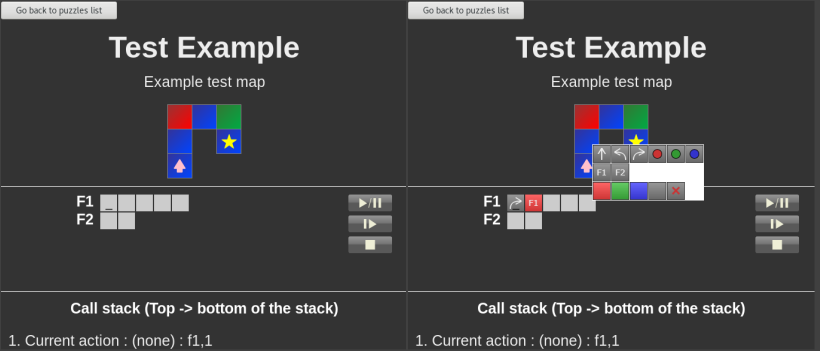
My first objective was to create an interface similar to the one on the robozzle website. I first took the resources used by the website and analysed how the HTML was generated, related to the current puzzle. I then took over the CSS to have a fairly similar interface. I implented the following components :
- The display of the puzzle and its information (name, number, etc.),
- A program made up of instruction sets that can be modified by the user,
- A panel of selectable actions that the user can click on when they click on a program case,
- A cursor displayed in the current program case being executed if the puzzle is being solved by the robot,
- Three buttons to respectively launch the automatic resolution of the program, launch a single instruction reading step, and reset the execution of the program,
- The display of the execution stack, providing a better understanding of our system for our teachers.
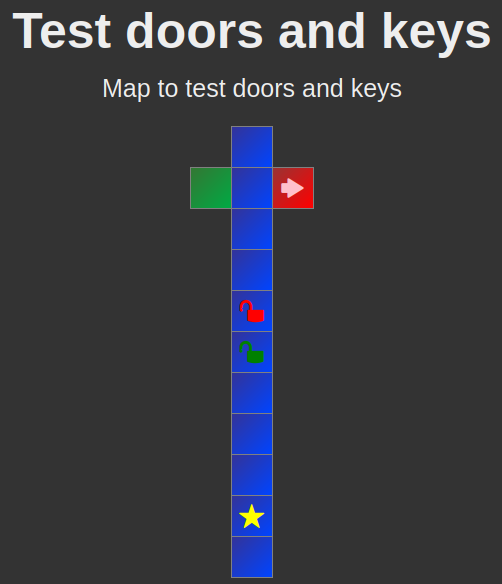
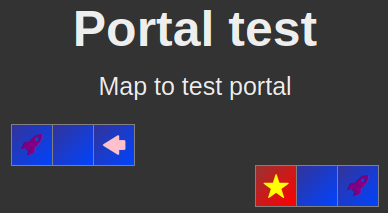
In a second and final time, I added new mechanics to the game. I added a portal that allows the robot to move from one place to another in one action, one instruction. I also added key and lock objects. The robot can't pass through locked locks and mut first retrieve the corresponding key (of the same color).
Visuals - (Click on one pick to enlarge it)

Hey test test